
When working in MS Excel, things may get a lot faster when you know a few keyboard shortcuts. Here is a non-exhaustive list of shortcuts which replace the most common operations such as opening files, saving files, copying, pasting, cutting, formatting, accessing menus and so on.
The ALT shortcuts
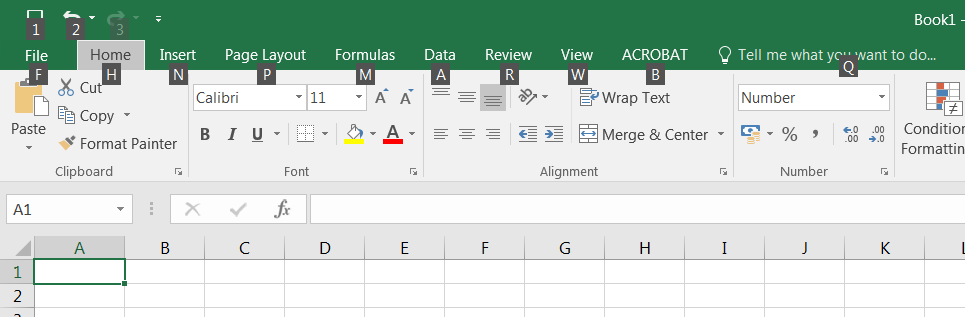 When working on an Excel worksheet, pressing
 ALT will display letters and numbers over the different menus and options (see picture to the right). Simply press ALT and one of the displayed letters to access the function or menu located under that letter. For instance, ALT+F will open the File menu whereas ALT+1 will offer to save your work. Submenus (such as the File menu) also offer shortcuts when ALT is pressed. Pressing ALT+S from the File menu thus offers to save your work. Note that it is possible to access a function which lays deep in a submenu by pressing ALT and the right combination of keys. Example: ALT+F+S will first open the File menu and then offer to save your work in a file; ALT+F+N will open the File menu and then open a new Excel workbook…
The CTRL shortcuts
…
Many other shortcuts may be found here.